Navigating Power Point Presentations on NetWellness
Power point presentations will appear in “outline” form when first opened. Outline form contains a navigation bar at the left side of the screen and slides notes across the bottom.
You can change the appearance of the slide show by using the navigation bar across the bottom of the presentation.

1. Outline: Turns left navigation bar on and off.

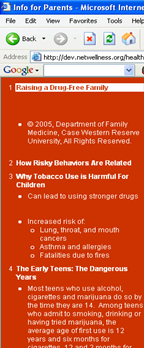
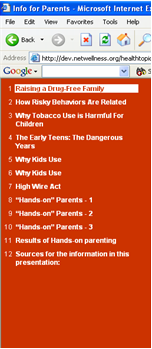
2. Expand/Collapse Outline: Controls appearance of side toolbar to show slide names only or full text of slides.

|
Expanded Outline: Lists slide name and text
|
Collapsed Outline: Lists slide name only
|
3. Notes: Turns notes appearing below the slide on and off.

4. Slide navigation: Forward and back arrows allow viewers to scroll through slides sequentially.

5. Slide show: Slides fill the screen for presentation-style viewing.

Users may scroll through the slides by clicking the mouse. Right click provides additional navigation to scroll forward and back through slides, and to end the slide show.

For more information:
Go to the NetWellness health topic.